Online

AI-Assisted Software Development with GitHub Copilot

John Miller

Discover how to revolutionize your software development workflow with GitHub Copilot and advanced AI tools in this comprehensive remote training designed for developers, technical leads, and engineering managers. Over five half-day sessions, you will gain hands-on experience mastering AI-assisted coding fundamentals, safe legacy code modernization, and accelerated greenfield project development. Learn to implement enterprise governance, enhance code quality, and boost productivity through practical AI workflows, automated testing, and prompt engineering techniques. Whether you’re looking to modernize existing systems or rapidly deliver new features, this training equips you with essential strategies and templates to harness AI effectively while managing risk and technical debt. Join this program to transform your team’s software engineering approach and stay ahead in the AI-powered development revolution.

This is an online event.

Click here to register for this event!
Sign up today and save $ 300!  Only $ 1,300!
(Early bird price is only good until 01/09/2026)

Transform Your Development Workflow with GitHub Copilot and Advanced AI Tools

Master the future of software engineering through three comprehensive training programs designed for modern development teams.

  • Duration: 5 half-days of 4 hours each (20 hours total)
  • Delivery: Remote (instructor in California; students distributed, class size 6-20)
  • Audience: Software developers who are familiar with GitHub and Copilot novices

Who Should Attend

Software developers, technical leads, and engineering managers ready to leverage AI for accelerated development, legacy system modernization, and greenfield project creation. You should have some experience using ChatGPT, Claude, or a smilar LLM, plus you should have some familiarity with GitHub Copilot and software development fundamentals.

What You'll Master

🚀 AI-Assisted Development Fundamentals (1 day)
Break into AI-powered coding with GitHub Copilot. Learn enterprise governance, hands-on implementation across different Copilot modes, and software engineering best practices that maintain code quality while dramatically boosting productivity.

🔧 Legacy Code Transformation (2 days)
Turn your brownfield nightmares into evergreen assets. Master safe legacy code modification, automated documentation generation, AI-assisted testing, and incremental modernization strategies that reduce technical debt while minimizing risk.

⚡ Greenfield Development Acceleration (2 days)
Transform requirements into working software faster than ever. Learn structured AI workflows, instruction files, custom chat modes, and prompt engineering techniques that turn concepts into production-ready code.

Why This Training Matters
The AI development era is happening now. Developers using AI tools report 30-50% productivity gains, but only when used correctly. This training teaches you to harness AI as a force multiplier while avoiding common pitfalls that lead to poor code quality and technical debt.

You'll gain:

  • Immediate productivity improvements through proper AI tool usage
  • Enterprise-ready governance frameworks for team adoption
  • Risk management strategies for production environments
  • Template libraries and workflows for ongoing success

Cost Matrix
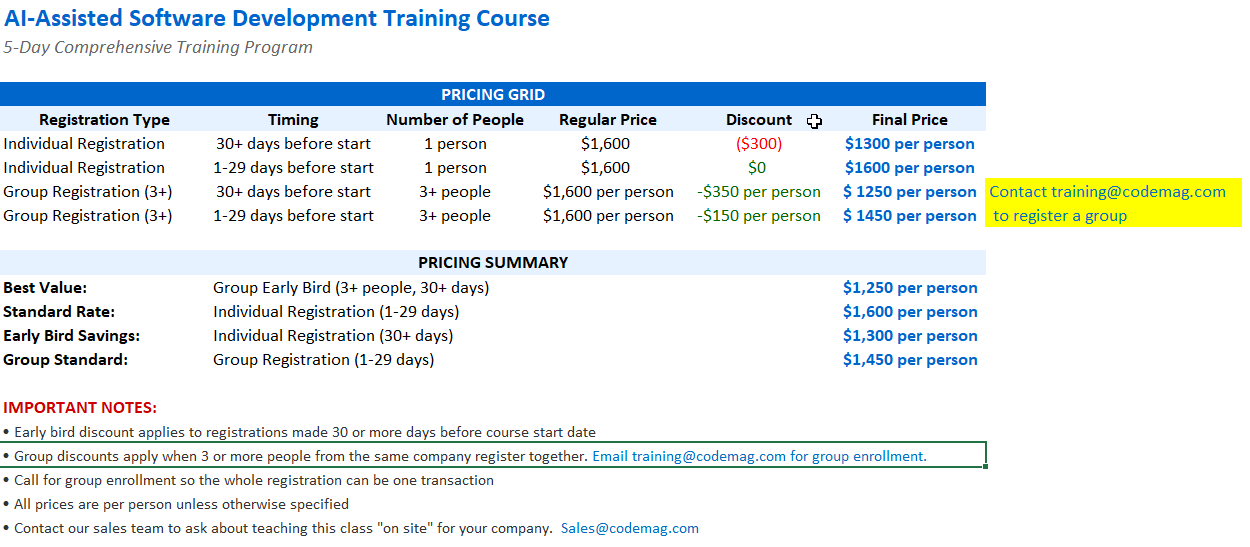
Price grid

Session Agenda:

Monday, February 9, 2026
10:00AM
to
10:30AM
Module 1: Foundations
John Miller
10:30AM
to
11:00AM
Module 2: GitHub Copilot for Teams
John Miller
11:00AM
to
12:00PM
Module 3: Hands-On Copilot Usage
John Miller
12:00PM
to
1:00PM
1:00PM
to
3:00PM
Module 4: AI Assisted SD Workflow
John Miller
Tuesday, February 10, 2026
10:00AM
to
10:30AM
Module 1: Setting the Foundation
John Miller
10:30AM
to
11:00AM
Module 2: Mastering AI Context Management
John Miller
11:00AM
to
12:00PM
Module 3: Instruction Files & Custom Instructions
John Miller
12:00PM
to
1:00PM
1:00PM
to
3:00PM
Module 4: Understanding Legacy Systems with AI
John Miller
Wednesday, February 11, 2026
10:00AM
to
11:00AM
Module 5: Building Safety Nets
John Miller
11:00AM
to
12:00PM
Module 6: Safe Legacy Code Modification
John Miller
12:00PM
to
1:00PM
1:00PM
to
3:00PM
Module 7: Strangling Technical Debt
Thursday, February 12, 2026
10:00AM
to
11:00AM
Module 1: AI-Assisted Workflow
John Miller
11:00AM
to
12:00PM
Module 2: Project Requirements & Foundation
John Miller
12:00PM
to
1:00PM
1:00PM
to
3:00PM
Module 3: Three AI Development Approaches
John Miller
Friday, February 13, 2026
10:00AM
to
12:00PM
Module 4: Integration & Best Practices
John Miller
12:00PM
to
1:00PM
1:00PM
to
3:00PM
Module 5: Hands-On Implementation
John Miller
Monday, February 9, 2026
Monday, AI Assisted SD Fundamentals
10:00AM to 10:30AM
Module 1: Foundations
John Miller
10:30AM to 11:00AM
Module 2: GitHub Copilot for Teams
John Miller
11:00AM to 12:00PM
Module 3: Hands-On Copilot Usage
John Miller
12:00PM to 1:00PM
Lunch Break
1:00PM to 3:00PM
Module 4: AI Assisted SD Workflow
John Miller
Tuesday, February 10, 2026
Tuesday: Foundations & Context Management
10:00AM to 10:30AM
Module 1: Setting the Foundation
John Miller
10:30AM to 11:00AM
Module 2: Mastering AI Context Management
John Miller
11:00AM to 12:00PM
Module 3: Instruction Files & Custom Instructions
John Miller
12:00PM to 1:00PM
Lunch Break
1:00PM to 3:00PM
Module 4: Understanding Legacy Systems with AI
John Miller
Wednesday, February 11, 2026
Wednesday: Legacy Code Transformation
10:00AM to 11:00AM
Module 5: Building Safety Nets
John Miller
11:00AM to 12:00PM
Module 6: Safe Legacy Code Modification
John Miller
12:00PM to 1:00PM
Lunch Break
1:00PM to 3:00PM
Module 7: Strangling Technical Debt
Thursday, February 12, 2026
AI-Assisted Software Development: Greenfield Devel
10:00AM to 11:00AM
Module 1: AI-Assisted Workflow
John Miller
11:00AM to 12:00PM
Module 2: Project Requirements & Foundation
John Miller
12:00PM to 1:00PM
Lunch Break
1:00PM to 3:00PM
Module 3: Three AI Development Approaches
John Miller
Friday, February 13, 2026
AI-Assisted Software Development: Greenfield Devel
10:00AM to 12:00PM
Module 4: Integration & Best Practices
John Miller
12:00PM to 1:00PM
Lunch Break
1:00PM to 3:00PM
Module 5: Hands-On Implementation
John Miller

Session Detail:

Module 1: Foundations

John Miller

Introduction to AI-Assisted Development

  • Why AI is revolutionizing software development and its career impact
  • General introduction to Large Language Models (LLMs)
  • Conceptual overview of how LLMs work with code
  • Capabilities and limitations of LLMs in coding contexts
  • Software engineering practices vs “vibe coding”
  • Essential do's and don'ts for AI-assisted development

Module 2: GitHub Copilot for Teams

John Miller

Enterprise Adoption and Governance

  • Organizational benefits: accelerated development, improved documentation, enhanced testing
  • Risk assessment: IP leakage, code quality, developer overreliance
  • Governance and compliance considerations
  • Data protection and licensing safeguards
  • Deployment options comparison (Individual vs Business vs Enterprise plans)
  • Best practices for safe organizational use

Module 3: Hands-On Copilot Usage

John Miller

Practical Implementation

  • GitHub Copilot overview and VS Code integration
  • Understanding instructions vs prompts vs custom chat modes
  • Installation, configuration, and team setup
  • Working with different Copilot modes (Ask, Edit, Agent, Custom)
  • Exercise #1: Forking course repositories
  • Exercise #2: Building a simple calculator with progressive features using test-driven development
  • Real-world coding scenarios and prompt engineering

Lunch Break

Monday lunch break

Module 4: AI Assisted SD Workflow

John Miller

Consolidation and Next Steps

  • Review of learning outcomes
  • Open Q&A session
  • Future learning opportunities and resources
  • Homework assignment: Finding and preparing a legacy codebase for continued practice

Module 1: Setting the Foundation

John Miller

Understanding Legacy vs. Evergreen Code

  • What defines legacy code (and what doesn't)
  • Why codebases degrade over time
  • The evergreen code philosophy: “If we rewrote it today, it would look exactly like this”
  • Building respect, not fear, for working systems

Pre-AI Checklist: Essential Safety Measures

  • Backup and rollback strategies (branching, commits, archiving)
  • Testing confidence frameworks
  • Change review processes
  • Incremental change methodology

Module 2: Mastering AI Context Management

John Miller

Managing GitHub Copilot Effectively

  • Treating Copilot as a managed junior developer
  • Understanding context windows and token limitations
  • Prompt design best practices
  • Model selection strategies (GPT-4o, Claude Sonnet, etc.)

Advanced Context Techniques

  • File and folder mentions (#-syntax)
  • Spaces and Knowledge Bases integration
  • Premium usage monitoring and optimization
  • Token estimation and context overflow detection

Lunch Break

Tuesday lunch break.

Module 4: Understanding Legacy Systems with AI

John Miller

Documentation Generation and Code Analysis

  • Automated README and documentation updates
  • Architecture diagram generation
  • Complex code explanation and mapping
  • Identifying technical debt hotspots

Hands-On Exercise: Legacy Code Documentation

  • Generate development and deployment guides
  • Create architecture diagrams
  • Update project documentation
  • Cross-validate with multiple AI models

Module 5: Building Safety Nets

John Miller

Test Automation and Code Quality

  • AI-assisted test generation (unit, integration, E2E)
  • Intelligent linting beyond static analysis
  • Coverage analysis and test adequacy assessment
  • Automated quality gates

Creating Robust Testing Frameworks

  • Generating comprehensive test suites
  • Test review and validation strategies
  • Balancing test coverage with maintainability

Module 6: Safe Legacy Code Modification

John Miller

Compliance and Gap Analysis

  • Comparing implementations against instruction files
  • Automated issue generation from compliance gaps
  • Prioritizing technical debt remediation
  • Creating actionable remediation plans

Multi-Model Implementation Comparison

  • Implementing changes with different AI models
  • Comparing approaches and outcomes
  • Risk assessment and quality evaluation
  • Best practice synthesis

Lunch Break

Wednesday lunch break.

Module 1: AI-Assisted Workflow

John Miller

  • High-level workflow from requirements to solution
  • Role of stakeholders and AI in each phase
  • Process visualization and workflow diagrams

Module 2: Project Requirements & Foundation

John Miller

  • Defining business rules and workflows
  • Technology stack and architecture decisions
  • Introduction to Zeus.Academia.2 project example
  • Conceptual models and Object Role Models
  • Use cases and data capture scenarios

Exercise: Create project requirement instructions

Lunch Break

Thursday lunch break.

Module 3: Three AI Development Approaches

John Miller

Instruction Files:

  • Persistent behavioral guidelines for AI
  • Coding standards and security policies
  • Repository-wide consistency

Prompt Files:

  • Executable task templates
  • Structured workflows for specific tasks
  • Repeatable automation patterns

Module 4: Integration & Best Practices

John Miller

  • Layered integration approach
  • When to use each method
  • Real-world implementation examples
  • Common pitfalls and how to avoid them

Lunch Break

Friday lunch break.

Module 5: Hands-On Implementation

John Miller

  • Creating custom chat modes with personas
  • Generating implementation prompts and verification
  • Agent configuration with safe commands
  • Testing and validation workflows