
AI-Assisted Legacy (Brownfield) Software Development with GitHub Copilot
March 23, 2026 | Online
Revolutionize your software development with GitHub Copilot in this comprehensive remote training for developers, technical leads, and engineering managers. Over five half-day sessions, you will gain hands-on experience mastering AI-assisted coding fundamentals and safe legacy code modernization. Learn to implement enterprise governance, enhance code quality, and boost productivity through practical AI workflows, automated testing, and prompt engineering techniques. Whether you’re looking to modernize existing systems or deliver new features, this class equips you with essential strategies and templates to harness AI effectively while managing risk and technical debt. Register for this course to transform your team’s software engineering approach and stay ahead in the AI-powered development revolution.
This event took place on Monday, March 23, 2026.
This class is full. Please register for the next iteration of this class the week of May 18-22, 2026. Next class
Transform Your Development Workflow with GitHub Copilot and Advanced AI Tools Master the future of software engineering through a comprehensive training class designed for modern development teams.
- Duration: Five half-days of 4 hours each (20 hours total). Note that hours are shown in the Central time zone.
- Delivery: Remote (instructor in California; students distributed, class size 6–15)
- Audience: Software developers who are familiar with GitHub and Copilot novices
Who Should Attend
Software developers, technical leads, and engineering managers ready to leverage AI for accelerated development, legacy system modernization, and greenfield project creation. You should have some experience using ChatGPT, Claude, or a similar LLM, plus some familiarity with GitHub Copilot and software development fundamentals.
What You'll Learn
The first three days of AI-Assisted Development Fundamentals lay a practical foundation for developers ready to work smarter with AI. Day one dives straight into hands-on coding — setting up tools, building a real C# project using GitHub Copilot, and mastering TDD, CI/CD pipelines, and AI instruction files. Day two broadens the picture with deeper coverage of LLM concepts, prompt engineering, documentation generation, and AI-driven testing strategies, giving you the frameworks to integrate AI responsibly across your entire development workflow. By day three, you're building custom AI agents, defining skills, and connecting Model Context Protocol (MCP) servers — putting you in control of a fully tailored, AI-powered development environment.
Legacy Code Transformation Day four puts AI to work on real-world legacy codebases. You'll learn how to safely assess and protect brownfield code, use AI to identify technical debt — from outdated patterns and security vulnerabilities to missing tests and architectural drift — and build a prioritized backlog in about an hour. Hands-on exercises walk you through implementing fixes, managing pull requests, and comparing AI model outputs to find the most effective solutions.
Greenfield Development The final day brings it all together with an AI-first approach to greenfield development. You'll follow a structured workflow — from generating business requirements and building tech stack instruction files to architecting with vertical slices and implementing features with AI-generated prompts. Live coding exercises walk you through the full cycle: implementation, pull requests, and AI-assisted code review — leaving you with a repeatable, production-ready methodology for building new applications with AI from the ground up.
Why This Training Matters The AI development era is happening now. Developers using AI tools report 30–50% productivity gains, but only when used correctly. This training teaches you to harness AI as a force multiplier while avoiding common pitfalls that lead to poor code quality and technical debt.
You'll gain:
- Immediate productivity improvements through proper AI tool usage
- Enterprise-ready governance frameworks for team adoption
- Risk management strategies for production environments
- Template libraries and workflows for ongoing success
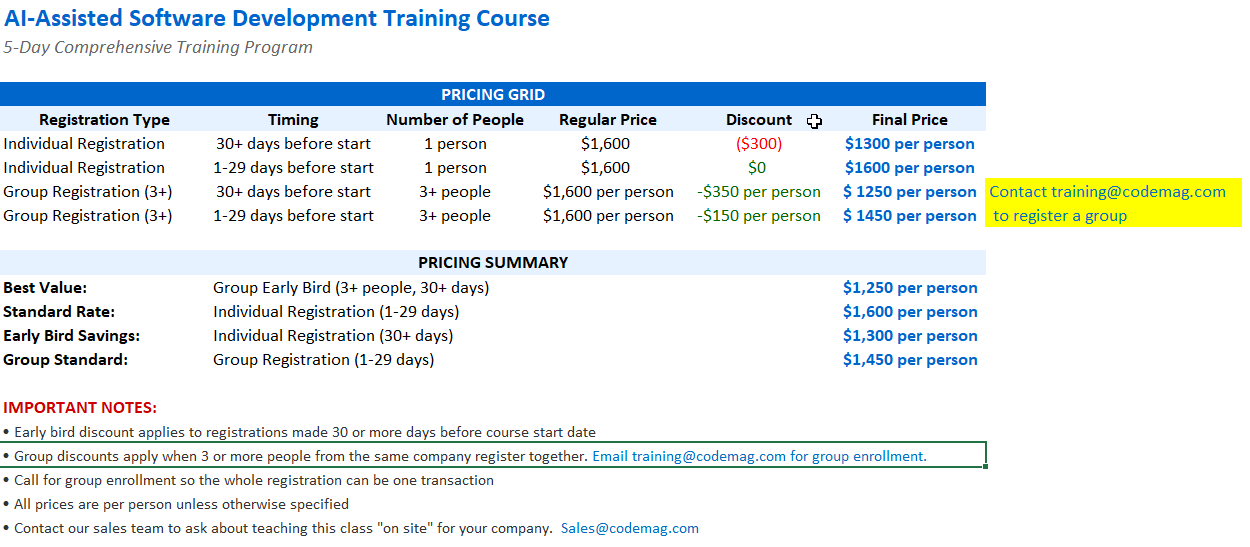
Cost Matrix
What's the Tech Stack for this Class?
- IDE: VS Code with the GitHub Copilot Extension
- SCC: GitHub
- Coding languages: C#, TypeScript, Vue.js
- Installation instructions: See this blog.
NOTE: The emphasis is on AI assistance and how to use AI effectively to generate code. The techniques are implementable in any tech stack. You are expected to have a bit of familiarity with VS Code and enough experience with GitHub to be able to clone a repository, but ask if you need help.
Training 5+ developers? Let's customize it.
Our AI-assisted development techniques work with any tech stack—but they're even more powerful when taught using your actual tools and project types. We'll tailor the class to your team's real-world needs.
AGENDA
| Monday, March 23, 2026 | ||
| 10:00AM | Introductions & WelcomeBREAKOUT | |
| 10:15AM | AI-Assisted Development Philosophy, Repository and Tool Setup, GitHub Copilot UI TourBREAKOUT | |
| 10:45AM | Lab: Calculator Project - Setup & Basic ImplementationBREAKOUT | |
| 11:30AM | Foundations of Using AI in Software DevelopmentBREAKOUT | |
| 12:00PM | 60-minute Break | |
| 1:00PM | Code Quality AnalysisBREAKOUT | |
| 1:15PM | Evergreen Code ConceptsBREAKOUT | |
| 1:30PM | Core Instruction Files & Provenance Tracking + Organizational vs. Repository Instruction FilesBREAKOUT | |
| 2:15PM | Exercise: Technology Inventory & Instruction GenerationBREAKOUT | |
| 2:30PM | Copilot Instruction Files and Context ManagementBREAKOUT | |
| 2:45PM | Creating Instruction Files with Sessions + Managing Instruction Files & Context WindowsBREAKOUT |
| Tuesday, March 24, 2026 | ||
| 10:00AM | Welcome back, questions, agenda + GitHub Copilot Pricing & LicensingBREAKOUT | |
| 10:15AM | VS Code Configuration Tips + LLMs + GitHub Copilot for Teams Key ConsiderationsBREAKOUT | |
| 10:30AM | Model Selection and Capabilities + Safety Measures & Best PracticesBREAKOUT | |
| 11:00AM | Managing Copilot & Context + Prompt FilesBREAKOUT | |
| 11:15AM | Hands-On Exercise: Creating Prompt FilesBREAKOUT | |
| 11:30AM | Creating Instruction Files from PromptsBREAKOUT | |
| 12:00PM | 60-minute Break | |
| 1:00PM | Documentation GenerationBREAKOUT | |
| 1:15PM | Architecture Diagrams with MermaidBREAKOUT | |
| 1:30PM | Code Explanation and AnalysisBREAKOUT | |
| 1:45PM | Code Translation and Technical Hotspot Analysis + Azure DevOps & GitHub Copilot ExtensionsBREAKOUT | |
| 2:00PM | Create a GH Personal Access Token + Test Automation & Code QualityBREAKOUT | |
| 2:15PM | Test Generation Capabilities + Prompt Guidance DiscussionBREAKOUT | |
| 2:30PM | Testing FrameworksBREAKOUT | |
| 2:45PM | Feature Flags and Test Suites + Testing in ProductionBREAKOUT |
| Wednesday, March 25, 2026 | ||
| 10:00AM | Welcome back, questions, agendaBREAKOUT | |
| 10:15AM | Custom AgentsBREAKOUT | |
| 10:30AM | SkillsBREAKOUT | |
| 10:45AM | Exercise: Building Custom AgentsBREAKOUT | |
| 11:15AM | Exercise: Defining SkillsBREAKOUT | |
| 12:00PM | 60-minute Break | |
| 1:00PM | Agent Best PracticesBREAKOUT | |
| 1:15PM | MCP (Model Context Protocol) ServersBREAKOUT | |
| 1:30PM | Exercise: MCP ServersBREAKOUT |
| Thursday, March 26, 2026 | ||
| 10:00AM | Welcome back, questions, agendaBREAKOUT | |
| 10:15AM | AI Practitioner Resources OverviewBREAKOUT | |
| 10:30AM | Fork RepositoryBREAKOUT | |
| 10:45AM | Protecting Brownfield Code BasesBREAKOUT | |
| 11:00AM | AI Implementation WorkflowBREAKOUT | |
| 11:15AM | Effective Prompts for Technical DebtBREAKOUT | |
| 11:30AM | Building a Backlog - Technical Debt IdentificationBREAKOUT | |
| 12:15PM | 60-minute Break | |
| 1:15PM | Prioritization & Issue ManagementBREAKOUT | |
| 1:30PM | Addressing Technical DebtBREAKOUT | |
| 1:45PM | Lab: Student implementation practiceBREAKOUT | |
| 2:30PM | Multi-Implementation ComparisonBREAKOUT |
| Friday, March 27, 2026 | ||
| 10:00AM | Welcome back, questions, agendaBREAKOUT | |
| 10:15AM | AI-First Development Methodology + Session Transition and PreviewBREAKOUT | |
| 10:30AM | Greenfield Development Workflow + AI-Assisted Workflow PatternBREAKOUT | |
| 10:45AM | Business Requirements Generation ExerciseBREAKOUT | |
| 11:00AM | Technology Stack Instruction FilesBREAKOUT | |
| 11:15AM | Vertical Slicing Architecture IntroductionBREAKOUT | |
| 11:30AM | Creating Vertical Slice Implementation PlansBREAKOUT | |
| 11:45AM | Dependency Analysis and PlanningBREAKOUT | |
| 12:00PM | Vertical Slice Review + Issue Identification & Diagram CorrectionsBREAKOUT | |
| 12:15PM | 60-minute BreakBREAKOUT | |
| 1:15PM | Implementation Prompts and VerificationBREAKOUT | |
| 1:30PM | Vertical Slice ImplementationBREAKOUT | |
| 2:00PM | Pull Request and Code ReviewBREAKOUT | |
| 2:15PM | Slice 4 Showcase - Order of Operations + GitHub Code Review with CopilotBREAKOUT | |
| 2:30PM | Slice 3 Showcase - Clear ButtonBREAKOUT | |
| 2:45PM | GitHub CLI & PR ManagementBREAKOUT | |
| 3:00PM | Adoption StrategyBREAKOUT |
| Monday, March 23, 2026 |
| 10:00AMBREAKOUT Introductions & Welcome |
| 10:15AMBREAKOUT AI-Assisted Development Philosophy, Repository and Tool Setup, GitHub Copilot UI Tour |
| 10:45AMBREAKOUT Lab: Calculator Project - Setup & Basic Implementation |
| 11:30AMBREAKOUT Foundations of Using AI in Software Development |
| 12:00PM 60-minute Break |
| 1:00PMBREAKOUT Code Quality Analysis |
| 1:15PMBREAKOUT Evergreen Code Concepts |
| 1:30PMBREAKOUT Core Instruction Files & Provenance Tracking + Organizational vs. Repository Instruction Files |
| 2:15PMBREAKOUT Exercise: Technology Inventory & Instruction Generation |
| 2:30PMBREAKOUT Copilot Instruction Files and Context Management |
| 2:45PMBREAKOUT Creating Instruction Files with Sessions + Managing Instruction Files & Context Windows |
| Tuesday, March 24, 2026 |
| 10:00AMBREAKOUT Welcome back, questions, agenda + GitHub Copilot Pricing & Licensing |
| 10:15AMBREAKOUT VS Code Configuration Tips + LLMs + GitHub Copilot for Teams Key Considerations |
| 10:30AMBREAKOUT Model Selection and Capabilities + Safety Measures & Best Practices |
| 11:00AMBREAKOUT Managing Copilot & Context + Prompt Files |
| 11:15AMBREAKOUT Hands-On Exercise: Creating Prompt Files |
| 11:30AMBREAKOUT Creating Instruction Files from Prompts |
| 12:00PM 60-minute Break |
| 1:00PMBREAKOUT Documentation Generation |
| 1:15PMBREAKOUT Architecture Diagrams with Mermaid |
| 1:30PMBREAKOUT Code Explanation and Analysis |
| 1:45PMBREAKOUT Code Translation and Technical Hotspot Analysis + Azure DevOps & GitHub Copilot Extensions |
| 2:00PMBREAKOUT Create a GH Personal Access Token + Test Automation & Code Quality |
| 2:15PMBREAKOUT Test Generation Capabilities + Prompt Guidance Discussion |
| 2:30PMBREAKOUT Testing Frameworks |
| 2:45PMBREAKOUT Feature Flags and Test Suites + Testing in Production |
| Wednesday, March 25, 2026 |
| 10:00AMBREAKOUT Welcome back, questions, agenda |
| 10:15AMBREAKOUT Custom Agents |
| 10:30AMBREAKOUT Skills |
| 10:45AMBREAKOUT Exercise: Building Custom Agents |
| 11:15AMBREAKOUT Exercise: Defining Skills |
| 12:00PM 60-minute Break |
| 1:00PMBREAKOUT Agent Best Practices |
| 1:15PMBREAKOUT MCP (Model Context Protocol) Servers |
| 1:30PMBREAKOUT Exercise: MCP Servers |
| Thursday, March 26, 2026 |
| 10:00AMBREAKOUT Welcome back, questions, agenda |
| 10:15AMBREAKOUT AI Practitioner Resources Overview |
| 10:30AMBREAKOUT Fork Repository |
| 10:45AMBREAKOUT Protecting Brownfield Code Bases |
| 11:00AMBREAKOUT AI Implementation Workflow |
| 11:15AMBREAKOUT Effective Prompts for Technical Debt |
| 11:30AMBREAKOUT Building a Backlog - Technical Debt Identification |
| 12:15PM 60-minute Break |
| 1:15PMBREAKOUT Prioritization & Issue Management |
| 1:30PMBREAKOUT Addressing Technical Debt |
| 1:45PMBREAKOUT Lab: Student implementation practice |
| 2:30PMBREAKOUT Multi-Implementation Comparison |
| Friday, March 27, 2026 |
| 10:00AMBREAKOUT Welcome back, questions, agenda |
| 10:15AMBREAKOUT AI-First Development Methodology + Session Transition and Preview |
| 10:30AMBREAKOUT Greenfield Development Workflow + AI-Assisted Workflow Pattern |
| 10:45AMBREAKOUT Business Requirements Generation Exercise |
| 11:00AMBREAKOUT Technology Stack Instruction Files |
| 11:15AMBREAKOUT Vertical Slicing Architecture Introduction |
| 11:30AMBREAKOUT Creating Vertical Slice Implementation Plans |
| 11:45AMBREAKOUT Dependency Analysis and Planning |
| 12:00PMBREAKOUT Vertical Slice Review + Issue Identification & Diagram Corrections |
| 12:15PMBREAKOUT 60-minute Break |
| 1:15PMBREAKOUT Implementation Prompts and Verification |
| 1:30PMBREAKOUT Vertical Slice Implementation |
| 2:00PMBREAKOUT Pull Request and Code Review |
| 2:15PMBREAKOUT Slice 4 Showcase - Order of Operations + GitHub Code Review with Copilot |
| 2:30PMBREAKOUT Slice 3 Showcase - Clear Button |
| 2:45PMBREAKOUT GitHub CLI & PR Management |
| 3:00PMBREAKOUT Adoption Strategy |