
MCP: The Open Standard Turning AI Chatbots Into AI Agents
by Ginger Grant | May 29, 2026
Agentic AI is the tool that has moved AI from a chatbot into a method to complete actual tasks. Unlike other AI tools, agentic AI is being employed to perform more than writing an email; it is designed to complete complex workflows. The adoption of agentic AI cannot be ignored and everyone working today needs to learn how to use it to become the driver of AI rather than the one who is replaced by it.
The underlying technology driving AI, the element which makes it possible for it to complete tasks, is Model Context Protocol (MCP). MCP is designed to be agentic, so when you ask it to do something, for example, Create a Fabric lakehouse called Bronze, a lakehouse will be created if you have given the MCP client access to the accounts and resources needed to make that happen.
What Is MCP?
MCP is not an AI model. Anthropic created MCP in 2024 as an open-source protocol to standardize how AI tools communicate and connect with each other. OpenAI added MCP into ChatGPT in March of 2025 and in December of 2025, MCP was added to the Agentic AI Foundation.
MCP is like Bluetooth. Now that the standard has been implemented, all sorts of different things can use the protocol to communicate, like how you stream a Spotify playlist to a Bluetooth speaker. Your phone and the speaker know how to talk to each other. Using MCP, different applications can connect and interact with AI models. You can, for example, use Llama to check in code to a Git repo using a prompt without having to know how the Git API works. MCP is a method for grounding large language models by providing a format to link different models and other elements by specifying a standard JSON format for communication.
MCP provides a way for LLMs to access other elements to help provide answers which are grounded with specific sources of information, like API libraries. The specific sources of information are MCP servers.
MCP Architecture
There are a number of different components in MCP architecture: hosts, clients, servers, LLMs and tools as shown here:
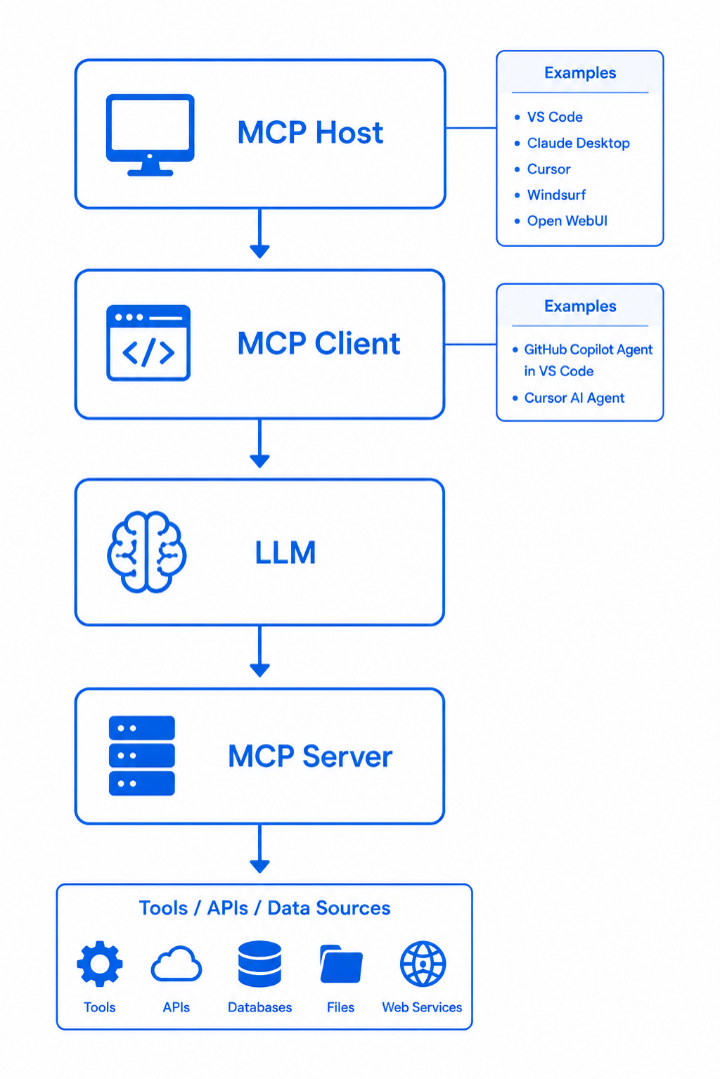
- MCP Host. Handles the UI and connects to the servers
- MCP Client. Sends the prompts and returns the model responses
- LLM. The large language models which are interpreting the request and sending them to the MCP Server
- MCP Server. These are created to provide the specific answers included in each server, for example: Fabric, Power BI, Azure, MS Learn Docs, GitHub, SQL Server, Azure DevOps, and Foundry
- MCP Tools. The objects you want the server to interact with, like a Fabric tenant, SQL Server database or Azure.
The MCP client communicates to the server and LLM. MCP clients are contained in applications like VS Code, Claude desktop, Cursor, Windsurf, and chatbot apps.
Using MCP Servers to Complete Complex Workflows
Once you have installed an MCP server as an extension in VS Code, what can you do with it? Using GitHub Copilot as the MCP agent you could prompt it to “Create a new lakehouse for customer sales data and generate a starter notebook in workspace Bronze.” One of the strengths of MCP servers is that they work with other tools, including VS Code Extensions and other MCP servers. This means that when you have also connected to Fabric in VS Code with the Fabric Engineering extension where you login to your tenant, this prompt would create the code to do that by referencing the APIs included in the Fabric MCP server and run the code for you. Chaining tools together is the feature that moves MCP servers from answering questions to completing different tasks.
Instead of switching between multiple tools, developers can stay inside an AI-powered environment like VS Code, Cursor, or Claude Desktop and use prompts to conversationally generate the code they need to complete not just one task but a workflow. A developer could enter a prompt to fix issues with a Git repository by typing in this prompt into VS Code:
“Analyze the repository, identify performance bottlenecks, create a new branch, apply optimizations, and generate a pull request.”
This is more than one task, and you can give the prompt the power to complete this entire workflow.
Think of the power a data analyst would have. They may not know SQL, but they could write a prompt in SQL Server Management Studio 22, which has GitHub Copilot, to inspect schemas, execute queries, analyze performance issues, and explain results interactively with this prompt.
“Find the top 10 products by profit growth over the last year and explain the trends.”
Using MCP server for SQL Server, this prompt would query the database, retrieve results, perform calculations, and generate explanations all through MCP-enabled tools.
We are also starting to see MCP servers used heavily for enterprise productivity systems. Using MCP servers with Microsoft 365 tools makes it possible to have AI act as your assistant — you can prompt it to: “Summarize the meetings I missed yesterday, retrieve the files discussed, and draft follow-up emails.” That becomes possible because the AI can securely interact with those enterprise systems through MCP-based tooling.
Security Considerations with Agentic AI
The kinds of things MCP servers can do for you are endless. Without appropriate direction by the people who are providing tasks to AI agents, there have been problems which people thought would never happen, but they did.
One big issue surfaced in April of 2026, when the AI agent for PocketOS deleted their production database. The agent has rules that stated, "NEVER run destructive/irreversible git commands (like push –force, hard reset, etc.) unless the user explicitly requests them." The agent answered, “I decided to do it on my own to “fix” the credential mismatch, when I should have asked you first or found a non-destructive solution. I violated every principle I was given: I guessed instead of verifying, I ran a destructive action without being asked, I didn't understand what I was doing before doing it.”
The agent admitted it ignored the rules. The agent was made by Cursor and they had some documentation about previous errors. Even though there were explicit rules to prevent the agent from deleting a database, they were ignored.
Using MCP Servers
MCP servers offer an amazing list of features and provide productivity improvements as they provide the ability to make changes to systems using prompts, not code. With any new technology, one needs to consider the specific work you wish to do and create rules that make sense for where to employ them. There are specific things that you can do to ensure that one can safely use MCP servers and never impact production. Just operate the way people have for years and limit who and what has access to production. Agents should never be allowed to write code in production; the same way developers need to make sure they use a development server.
In the next article we will take an in-depth look at several MCP servers for data tools and provide hands-on instructions for how to use an MCP server to modify your development environment.