
How Fabric IQ Grounds AI Answers in Your Business Data
by Ginger Grant | November 1, 2026
Fabric IQ
AI agents that answer questions about business data often return wrong results. They don't know what tables and columns mean, how entities relate, or which business rules apply. Fabric IQ fixes this by grounding a large language model (LLM) in an ontology: a model of business entities, relationships, and rules bound to data already in OneLake. The easiest way to build an accurate ontology is to start from a well-documented Power BI semantic model and add descriptions, synonyms, and sample questions. You can then point a Fabric data agent at the ontology so users can ask questions in plain English.
An ontology can draw on semantic models, lakehouses and eventhouses without copying data, and the semantic models you already maintain supply much of the business context.
What Is an Ontology?
Businesses typically create ontologies to document the terms, properties and relationships in more detail than a database can. Data that has already been curated for reporting is a good source, so in most cases a Power BI semantic model provides much of the information the ontology needs. However, a semantic model is just the starting point. It provides context for its own data, but not everything the ontology needs. To improve grounding, you need to add relationship definitions, business rules, and field descriptions. You don't have to use a semantic model to create an ontology in Fabric IQ, but it's the easiest way to start. Without one, you must add every OneLake item and write every description yourself.
Internally, an ontology is stored as a graph: entities are nodes and relationships are edges. You can view these relationships in Fabric IQ, as shown in Figure 1.
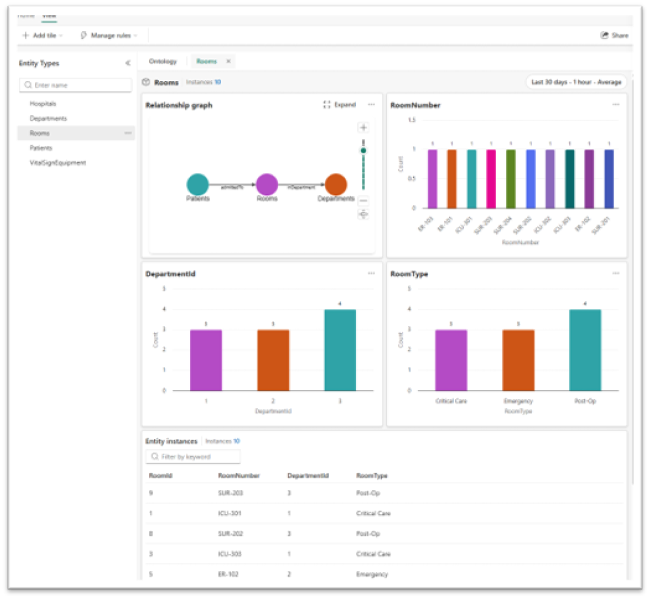
Figure 1: Fabric IQ Entity Type Detail
Using AI to Improve the Ontology
A well-documented semantic model really improves ontology quality and reduces manual work. You can improve the ontology further in VS Code. Using AI, you can generate descriptions and synonyms for every table, measure, and column in the semantic model. These descriptions give the LLM more context to ground its answers. Also complete Power BI's Prep data for AI steps (Figure 2). Both directly affect how well the agent answers.
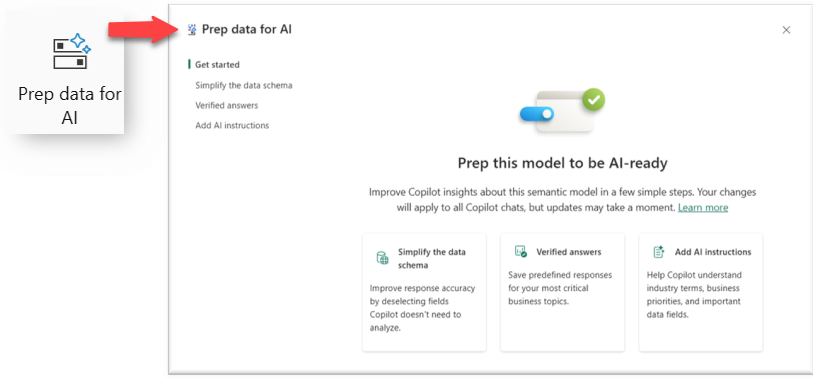
Figure 2: Semantic Model Prepping Data for AI
You can also improve the ontology's accuracy by providing sample questions that reflect what users are likely to ask.
Data Agents for Fabric IQ
In Fabric, you can create a data agent and point it to the ontology so you can ask it questions in plain English. It can return T-SQL code, DAX queries, or a text answer. OneLake security is enforced, so if a user doesn't have access to an underlying item, such as a table in a lakehouse, the data agent won't return answers based on it. The data agent is read-only: it can answer questions about the data but can't change it. Answers are capped at 25 rows. Data agents currently use Microsoft-managed AI models and do not allow direct model selection.
NOTE: Microsoft could change the 25-row limit.
The more business context you add up front, the more accurate the data agent's answers will be.